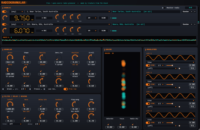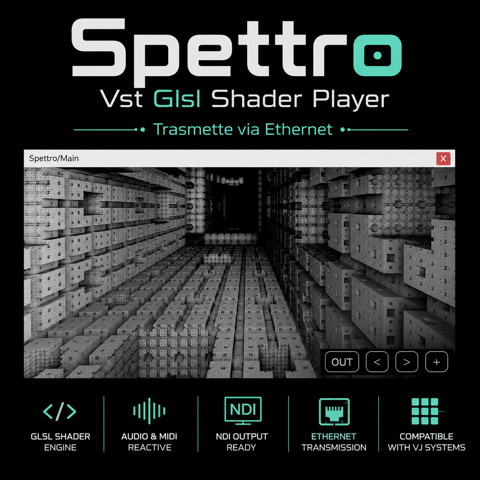
Spettro is a free GPU-powered audio visualizer from Creature From The Black. It runs as a VST3 inside a DAW and turns incoming audio into real-time graphics while leaving the audio signal itself untouched.
The plugin supports built-in psychedelic scenes, custom GLSL shaders, Shadertoy-style material, multipass rendering, FFT and waveform data, MIDI-selectable shader libraries, plus Spout and NDI output for tools such as OBS, Resolume and vMix.
Free visual tool: Spettro is designed for producers, streamers, VJs and audiovisual performers who want visuals generated directly from the audio inside their production environment.
What Is Spettro?
Spettro is not an audio effect in the traditional sense. It analyzes the signal and exposes information to a graphics engine. That engine renders shader-based scenes on the GPU, making the plugin a bridge between music production and real-time visual performance.
This is useful for artists who want a visual layer synchronized directly to their DAW without manually exporting audio to a separate program first.
At a Glance
- Real-time GPU visualizer
- VST3 and standalone operation
- Four built-in psychedelic scenes
- GLSL shader import
- Shadertoy and GLSL Sandbox compatibility concepts
- Multipass rendering
- Audio-reactive FFT and waveform uniforms
- Large MIDI-selectable shader library support
- Spout output
- NDI output
- Designed for OBS, Resolume, vMix and VJ workflows
GLSL Shader Support
The most powerful feature is the ability to load GLSL shaders rather than being limited to a fixed set of visual presets. GLSL is a graphics shading language used to create procedural visuals on the GPU. That means Spettro can become a host for a large range of community-made or custom-coded effects.
Artists familiar with Shadertoy or GLSL Sandbox can adapt material for audio-reactive performance. Multipass support allows more complex scenes where one rendering stage feeds another.
Audio Reactivity
FFT data describes energy across frequency bands, while waveform data follows the time-domain shape of the audio. Spettro exposes this information to shaders so a visual can respond differently to bass, mids, highs or transient movement.
A kick might expand geometry, high frequencies can alter colour or detail, and overall amplitude can drive scale or brightness. The result depends entirely on the shader design.
Spout and NDI Output
Spout is widely used on Windows to share video frames between applications with very low overhead. NDI sends video over a network and is useful for streaming or multi-computer setups.
With these outputs, Spettro can feed OBS for livestreams, Resolume for VJ performance or vMix for broadcast workflows. The DAW remains the audio source while the visual output is routed to whichever application handles presentation.
MIDI Shader Selection
Large shader libraries can be selected through MIDI, making Spettro practical during live performance. Instead of clicking through files, an artist can map visual changes to a controller or sequence them from the DAW.
Performance idea: Put Spettro on a master or dedicated visual bus, route the output through Spout to OBS, then automate shader changes from MIDI clips. One timeline can control both the music and the visual scene.
Who Is Spettro For?
Spettro is relevant to electronic musicians, YouTube creators, Twitch streamers, live performers, VJs and installation artists. It is especially attractive if the production already lives inside a DAW and the goal is to make visuals react to the exact same audio timeline.
Video Demo
The official Creature From The Black clip below shows SPETTRO running GLSL audio-reactive visuals with MIDI and NDI-oriented functionality.
Compatibility
- Format: VST3
- OS: Windows 10/11 64-bit
- GPU: OpenGL 3.2 capable graphics required
- Standalone: Available
- NDI: Runtime required only when using NDI output
- Audio processing: Visual analysis only; audio remains untouched
How to Download Spettro
- Open the official Ko-fi product page.
- Download the current Windows package.
- Install the VST3 in your plugin directory.
- For Spout or NDI workflows, configure the receiving application separately.
- Load a built-in scene or import compatible GLSL material.
Final Verdict
Spettro fills a niche that is often handled outside the DAW. By putting a GPU shader visualizer directly in the production chain, it makes audiovisual synchronization easier and opens a route from audio analysis to OBS and VJ software.
It will not improve your mix. It may, however, make the mix look as if it has developed opinions about geometry.
Download Spettro for Free