SURVIVE by quietformat: Free Advanced Clipper VST3
Advanced clipping, stereo control, True Peak protection and oversampling inside a completely free production tool.
SURVIVE by quietformat is a free advanced clipping processor designed for producers, mixing engineers and mastering engineers who want more control than a conventional one-knob clipper.
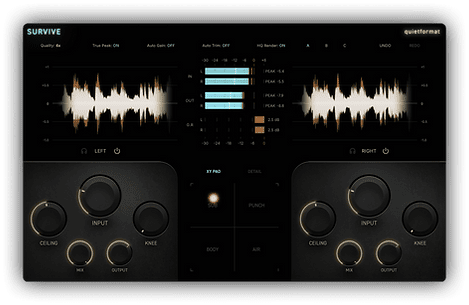
The plugin combines clipping with detailed stereo processing, waveform visualization, oversampling and True Peak management.
It can be used to control transients, increase perceived loudness, reshape drums or prepare a mix before final limiting.
More Than a Basic Clipper
Clipping is one of the simplest ways to control short peaks before they reach a limiter, but modern clipping tools can do much more than simply cut the top of a waveform.
SURVIVE is designed around a more flexible workflow, giving producers direct control over how the signal enters the clipping stage and how aggressively peaks are reshaped.
This makes it useful on individual tracks, buses and potentially the final mix depending on how carefully it is configured.
Independent Stereo Processing
SURVIVE provides independent processing options for the stereo signal.
This can be particularly useful when the left and right channels contain different peak structures or when producers want more precise control over the center and sides of a mix.
Mid/Side processing opens additional possibilities for mastering and bus processing.
For example, the center of a mix often contains the kick, bass, snare and lead vocal, while stereo ambience and wider instruments occupy more of the side information.
Being able to treat these areas differently can make clipping more controlled and transparent.
Real-Time Waveform Display
One of SURVIVE’s most useful workflow features is its real-time waveform display.
The interface allows producers to visually compare the signal before and after processing.
This makes it easier to understand how much of the transient is being removed instead of relying purely on numerical values.
Visual feedback is especially useful when clipping drum transients, percussion, bass-heavy material or a complete mix where excessive clipping can quickly remove punch.
2x, 4x and 8x Oversampling
SURVIVE includes several oversampling options:
- 2x oversampling
- 4x oversampling
- 8x oversampling
Oversampling allows nonlinear processing to operate internally at a higher sample rate.
This can help reduce unwanted aliasing created when clipping introduces additional harmonic content.
Higher settings generally require more CPU power, so producers can use lighter modes while mixing and increase the quality when rendering the final track.
ADAA Nonlinear Clipping
The clipping stage combines oversampling with ADAA processing.
ADAA, or Antiderivative Anti-Aliasing, is a technique designed to reduce aliasing generated by nonlinear audio processing.
For clipping, saturation and distortion-style algorithms, this can help maintain a cleaner high-frequency response when the processor is driven harder.
The result is a clipping tool designed to provide aggressive peak control without simply ignoring the digital artifacts that can appear during heavy nonlinear processing.
True Peak Detection
SURVIVE also includes True Peak detection and ceiling control.
Sample peaks are not always the highest level that can occur when digital audio is reconstructed during playback.
True Peak monitoring helps account for potential inter-sample peaks and is therefore especially relevant when a clipper is used near the end of a mastering chain.
A controlled ceiling can help prevent unexpected peaks from appearing after conversion or playback.
HQ Render Mode
quietformat also includes an HQ Render mode for offline export.
This is useful when you want to keep real-time CPU consumption reasonable while producing but still use higher-quality processing during the final bounce.
The concept is simple: work efficiently during the session, then allow the plugin to use its higher-quality processing when exporting the finished track.
Use SURVIVE on Drums
Drums are one of the most obvious applications for a clipper.
A kick or snare can contain extremely short peaks that force a limiter to work much harder than necessary.
Using SURVIVE before the limiter can shave a small amount from those transients while maintaining much of the perceived punch.
Start conservatively. Removing one or two decibels from the sharpest peaks can often be more useful than aggressively flattening the entire drum signal.
Try It Before Your Final Limiter
SURVIVE can also be tested directly before the final limiter in a mastering chain.
The clipper handles the fastest peaks first, allowing the limiter to focus more on overall level control.
A simple chain could look like this:
- Corrective EQ
- Compression if required
- Saturation or tonal processing
- SURVIVE
- Final limiter
The goal is not necessarily to make the clipper audible. In many mastering situations, subtle peak reduction is enough to make the limiter behave more smoothly.
Parallel Clipping for More Punch
Aggressive clipping does not always need to replace the original signal.
On drums or percussion, heavily processed audio can be blended with the clean source to add density and aggression while retaining the original transient structure.
This type of parallel processing can be particularly useful for electronic drums, Tech House, EDM, Hip-Hop, Trap and harder club productions.
Useful Across Modern Production Styles
SURVIVE is not tied to one musical genre.
Its clipping and peak-control tools can be useful for:
- House
- Afro House
- Tech House
- EDM
- Techno
- Hip-Hop
- Trap
- Pop
- Drum & Bass
- Mastering
Any production with sharp transients or a need for additional loudness control can potentially benefit from careful clipping.
macOS and Windows Support
SURVIVE is available for both macOS and Windows.
The available plugin formats are:
- macOS: VST3 and AU
- Windows: VST3
This makes the plugin suitable for most modern DAWs supporting these formats.
How to Get SURVIVE
SURVIVE is currently offered free through the official quietformat website.
To receive the download, users enter an email address on the SURVIVE page and agree to receive the quietformat newsletter.
There is no purchase price for the plugin itself.
SURVIVE at a Glance
Developer: quietformat
Plugin: SURVIVE
Type: Advanced Clipping Processor
Processing: Stereo / L-R / Mid-Side
Oversampling: 2x / 4x / 8x
Anti-aliasing: ADAA nonlinear processing
Metering: Real-time waveform display
Peak control: True Peak detection and ceiling
Rendering: HQ Render mode
macOS: VST3 / AU
Windows: VST3
Price: Free at the time of publication
Download SURVIVE for Free
SURVIVE is currently available free from the official quietformat website. Enter your email address and subscribe to the newsletter to receive the plugin.
Final Thoughts
SURVIVE offers considerably more control than the typical free clipping plugin. Independent stereo processing, Mid/Side options, waveform visualization, multiple oversampling modes, True Peak management and an HQ rendering mode make it useful from individual drum tracks all the way to mastering. For producers who use clipping as a genuine mixing tool rather than simply another way to make everything louder, quietformat has created a surprisingly complete free processor.