GrainBrain by XNULLX is a free VST plugin designed for producers who want to take granular processing far beyond a single global effect. Instead of treating the entire signal as one block of audio, GrainBrain divides it into four independent frequency bands and gives each region its own granular engine, modulation system, rhythmic gate and processing controls.
The result is a creative audio effect that can preserve one part of a sound while completely dismantling another. Bass frequencies can remain relatively controlled while the upper spectrum becomes a cloud of reversed fragments, shifting grains, rhythmic motion and evolving texture. For electronic music producers, ambient composers, experimental beatmakers and sound designers, that multiband architecture gives GrainBrain a particularly interesting identity among free sound design plugins.
What Is GrainBrain?
GrainBrain is a stereo four-band multiband granular processor from XNULLX. It is an audio effect rather than a virtual instrument, which means it processes audio already passing through a track in your DAW.
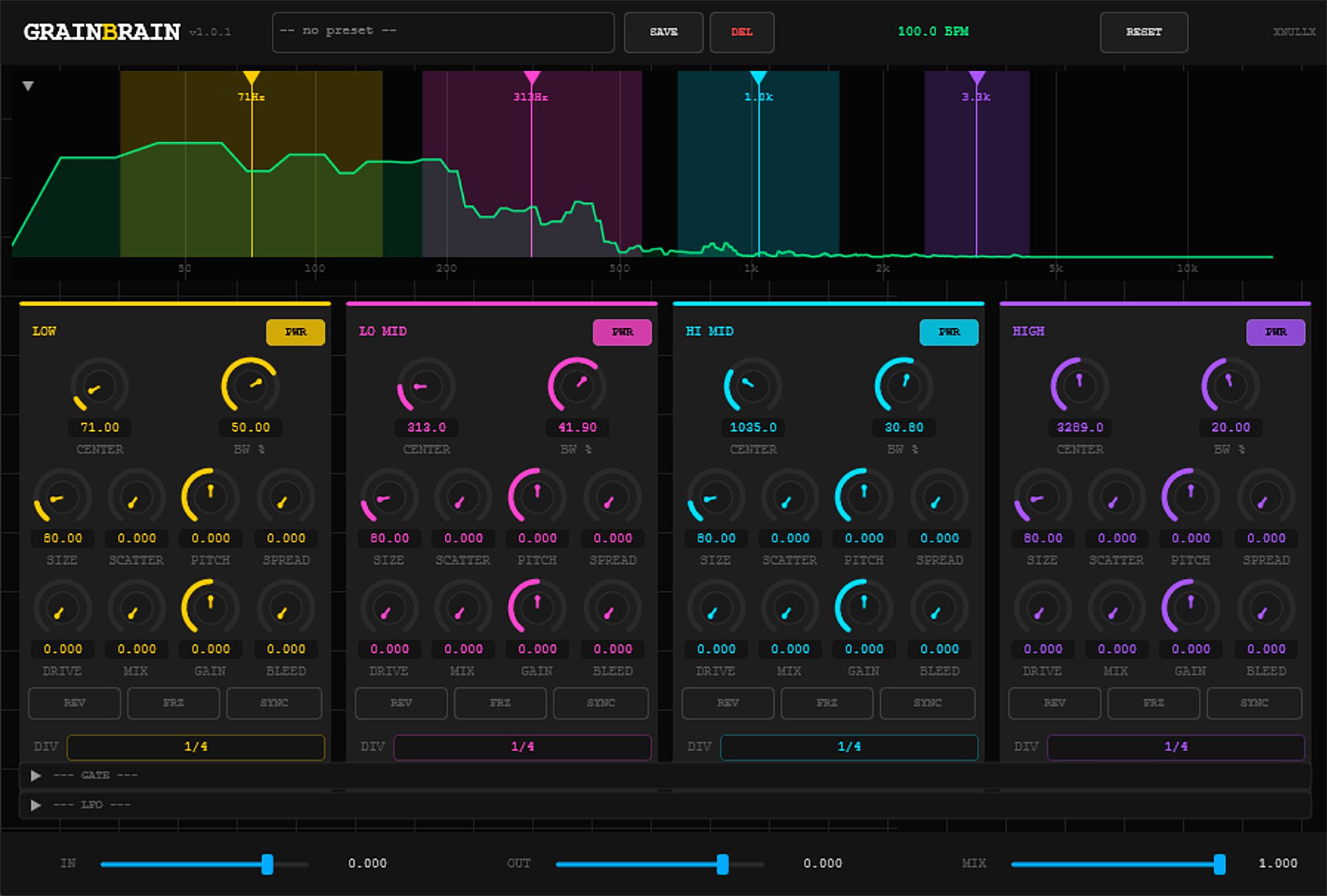
The incoming signal is divided into four independently adjustable frequency regions. Each band then feeds its own eight-voice granular engine. This allows the low, low-mid, high-mid and high-frequency areas of a sound to behave differently instead of being forced through the same granular settings.
That distinction is important. Traditional granular effects can quickly turn an entire source into a dense wash of fragments. GrainBrain gives producers more control over where that transformation happens. You can preserve the fundamental weight of a bass sound while scattering its upper harmonics, create rhythmic movement only in selected frequency areas or freeze one part of the spectrum while the rest continues to evolve.
Why This Free VST Plugin Matters for Producers
Granular processing is one of the most powerful tools for transforming familiar sounds into new material, but it can also become difficult to control. Once an entire signal is fragmented, pitch-shifted and scattered, important elements such as low-end definition, transient clarity or tonal focus can disappear quickly.
GrainBrain approaches that problem with a multiband workflow. The processor lets you decide which areas of the frequency spectrum should remain relatively stable and which ones should become experimental.
For electronic music production, this can turn a simple synth loop into a layered texture without automatically sacrificing its bass foundation. For cinematic sound design, a single recording can be divided into several evolving frequency zones. For beatmaking, rhythmic gates and tempo-synchronized grain sizes can generate movement from material that originally sounded static.
This makes GrainBrain more than a novelty effect. Its experimental side is obvious, but its architecture also supports controlled processing when the settings are used carefully.
Main Features and Workflow
- Four independent frequency bands for multiband granular processing
- An independent eight-voice granular engine for each band
- Adjustable band center frequency and bandwidth
- Real-time spectrum display for visual frequency positioning
- Grain size, scatter, pitch, spread, drive and wet/dry control per band
- Reverse granular playback
- Freeze processing for sustained granular textures
- Host-synchronized grain timing
- Per-band rhythmic stutter gates
- Dedicated LFO modulation for every frequency band
- Multiple LFO destinations including filter position, width, mix, pitch, scatter, grain size and gate phase
- Cross-band Bleed routing between adjacent frequency regions
- Global input, output and dry/wet controls
- VST3 support for Windows and macOS
- AU support for macOS
A Four-Band Approach to Granular Sound Design
The central idea behind GrainBrain is its four-band signal structure. The plugin separates the incoming stereo signal into Low, LowMid, HiMid and High regions. Each band has its own center frequency and bandwidth controls, allowing the processing zones to be repositioned according to the source material.
The spectrum analyzer provides a visual representation of the incoming audio and the active frequency regions. Producers can use this display to position processing around the most important parts of a sound rather than relying only on numerical values.
This becomes especially useful with complex source material. A drum loop, for example, contains low-frequency kick energy, midrange body and high-frequency percussion. GrainBrain allows those elements to be processed with different granular behavior inside one plugin instance.
A producer could keep the low band relatively stable, introduce moderate scatter into the midrange and apply more extreme reverse or freeze processing to the highs. The result can retain rhythmic weight while creating a much more complex surface around it.
Independent Eight-Voice Granular Engines
Each of GrainBrain’s four bands contains an independent eight-voice granular engine. Incoming audio is written into a circular buffer, then played back as overlapping grains.
The Size control determines the duration of those grains. Very short settings can move the sound toward dense, smeared or noisy textures, while longer settings can preserve larger fragments of the source and create more obvious looping or stuttering behavior.
Scatter changes where grains are read from the available audio buffer. Lower settings maintain a stronger relationship with the original material. Increasing Scatter introduces more variation in the read position, allowing the sound to become increasingly diffuse and unpredictable.
Pitch shifts the grains, while Spread introduces independent pitch variation around the main pitch setting. Small amounts of spread can add movement and width to a texture. More extreme values can produce dense clusters and heavily transformed material.
Drive applies saturation within the granular engine, adding another layer of tonal shaping before the processed signal is blended with the original frequency band.
Reverse, Freeze and Tempo-Synchronized Grain Processing
GrainBrain includes several tools for moving from subtle texture enhancement into more radical sound transformation.
The REV control reverses grain playback. Because this operates inside the granular engine, the result is different from simply reversing an entire audio file. The original performance continues to feed the processor while individual grains play backward, creating continuously shifting reverse textures.
The FRZ function stops new audio from being written into the active buffer for that band. The captured material can then continue to generate grains indefinitely. Combined with Scatter, Pitch and Spread, this can transform a short moment of audio into a sustained pad, drone or atmospheric layer.
Grain size can also be synchronized to the host tempo. This gives producers a more rhythmic approach to granular processing, particularly when working with drums, loops, arpeggios and tempo-based electronic arrangements.
The Bleed Network Adds Cross-Band Interaction
One of GrainBrain’s more unusual features is its Bleed system. Instead of keeping all four granular bands completely isolated, the plugin can inject part of a band’s processed output into the next frequency region.
The routing moves through the bands in sequence, from Low to LowMid, LowMid to HiMid, HiMid to High and then back toward Low.
This creates interaction between frequency regions that would otherwise behave independently. A processed low-frequency texture can influence the next band, while more extreme settings can build increasingly complex, saturated or sustained material across the signal path.
Bleed is therefore less about conventional multiband precision and more about controlled instability. Used subtly, it can help different granular layers feel connected. Pushed harder, it can become part of the sound design itself.
Per-Band Rhythmic Stutter Gates
Each frequency band also includes its own tempo-synchronized stutter gate. The gate can create rhythmic amplitude movement after the granular processing stage.
Controls for depth, attack, release and phase make it possible to shape the movement rather than relying on a basic on-and-off chopping effect. Different rhythmic divisions and phase positions can be used across the four bands, allowing separate frequency areas to pulse at different moments.
This is particularly useful for electronic music production. A low band can remain stable while the midrange pulses on the beat and the high-frequency texture moves around the offbeats. Because each section can be treated independently, one source can generate a surprisingly complex rhythmic structure.
Four Independent LFO Modulation Systems
GrainBrain includes a dedicated LFO for each frequency band. These modulation systems can animate several important parameters, including band center frequency, bandwidth, wet/dry mix, pitch, scatter, grain size and gate phase.
The available LFO shapes include smooth and more abrupt movement types, giving the plugin options for slow evolving textures as well as harder rhythmic modulation.
The LFO can run freely or synchronize with the host tempo. This makes it possible to create very slow spectral movement for ambient material, synchronized modulation for electronic music or faster motion for more aggressive timbral effects.
Because every band has its own modulation source, GrainBrain can produce movement across the spectrum instead of applying one identical modulation curve to the entire signal.
Sound and Processing Character
GrainBrain does not impose one fixed sound on every source. Its character depends heavily on how the four granular bands are configured.
At moderate settings, it can add movement, diffusion and shifting detail around an existing sound. Small amounts of scatter, subtle pitch spread and a restrained wet mix can create additional texture without completely replacing the source.
At more extreme settings, the plugin moves into experimental territory. Reverse grains, frozen buffers, heavy pitch variation, cross-band Bleed and independent modulation can transform relatively ordinary recordings into drones, glitches, abstract percussion, evolving atmospheres and unstable synthetic textures.
The multiband design is the key to keeping these transformations usable. Instead of choosing between completely dry and completely destroyed, producers can decide which frequency areas should carry the original identity of the sound.
Important Master and Band Controls
Each band includes controls for grain size, scatter, pitch, pitch spread, drive, mix, gain and Bleed. Reverse, freeze and synchronization functions can also be activated independently.
The master section provides input level, output level and an overall Mix control. This makes it possible to place the full GrainBrain effect underneath the original source after balancing the four internal bands.
The plugin’s visual sections can also be collapsed to reduce the amount of interface space occupied when the deeper controls are not required.
Plugin Formats and Operating System Compatibility
GrainBrain is available for Windows and macOS.
- Windows: VST3
- macOS: VST3 and AU
- Plugin type: Audio effect
The developer does not currently publish specific minimum operating system versions on the GrainBrain product page. Producers should therefore check the current official download page before installation rather than assuming compatibility with every version of Windows or macOS.
No Linux, AAX or VST2 version is listed on the official product page.
Installation and Registration
GrainBrain can be downloaded directly from the official XNULLX product page. Separate installers are provided for Windows and macOS.
The developer currently notes that the Windows installer is not code-signed, which means Windows may display a SmartScreen warning during installation. This is an important detail for users who prefer signed installers or who work in tightly controlled studio environments.
XNULLX describes its plugins as donationware and states that there are no license keys, crippled demo restrictions or subscriptions.
Visit the official GrainBrain product and download page
Who Should Use GrainBrain?
GrainBrain is particularly relevant for producers and sound designers who enjoy processing audio as raw creative material rather than simply applying conventional corrective effects.
Electronic music producers can use it to transform synth loops, percussion, bass layers and vocal fragments. Ambient and cinematic composers can create drones and evolving textures from short recordings. Beatmakers can use synchronized grains and independent gates to generate rhythmic variations from existing loops.
It can also be useful for producers who already own granular effects but want more control over different areas of the frequency spectrum.
Best Use Cases
Transforming Synth Loops
A relatively simple synth sequence can be divided into several spectral layers, with controlled low frequencies and increasingly complex granular processing toward the upper bands.
Creating Ambient Pads From Existing Audio
Freeze, pitch spread and longer grain settings can turn short recordings into sustained atmospheric material. Different settings across the four bands can help the resulting pad remain more detailed than a single full-range freeze effect.
Experimental Drum Processing
Tempo synchronization, scatter and per-band gates can reshape drum loops while preserving selected parts of the original groove.
Vocal Sound Design
Spoken phrases, sustained vocals and short vocal fragments can become granular layers, reverse textures or evolving backgrounds without forcing every part of the frequency spectrum through the same processing settings.
Cinematic and Game Audio
Field recordings, impacts, mechanical sounds and environmental audio can be divided into several independently moving layers, making GrainBrain relevant for experimental sound design outside conventional music production.
Important Limitations
GrainBrain is a specialized creative effect. It is not designed to replace a conventional EQ, compressor, reverb or general-purpose mixing processor.
The interface contains a large number of controls when all sections are expanded, so producers looking for a one-knob granular effect may find the workflow more involved than simpler alternatives.
The current Windows installer is not code-signed. The developer has also acknowledged some early-release quirks and is working on quality-of-life improvements.
Official compatibility is currently limited to the formats and operating systems listed by XNULLX. Users should not assume the existence of VST2, AAX or Linux versions unless the developer announces them in the future.
License, Availability and Price
GrainBrain is distributed as donationware. XNULLX states that its plugins are free to download and use, with optional financial support for the project.
No license key or subscription is required according to the developer.
Because no broader formal license terms are stated on the product page, users who require specific legal confirmation for a particular professional or commercial workflow should rely on the developer’s current official terms rather than assuming rights that are not explicitly documented.
Visit the official XNULLX website
Download GrainBrain from the official developer page
Official Audio Demos
Listen to the official GrainBrain dry and processed audio examples
Why Free Granular Plugins Like GrainBrain Matter
Free music production software is most valuable when it does more than imitate a basic tool that producers already have inside their DAW. GrainBrain takes a more ambitious route.
Its multiband architecture, independent granular engines, cross-band routing and deep modulation system give producers access to a form of sound design that can be difficult to reproduce with a single conventional effect.
For independent producers and home studio musicians, tools like this can expand the creative possibilities of existing recordings without requiring another large software investment. The important point is not simply that GrainBrain is free. It is that the plugin offers a distinctive workflow that can lead to sounds a producer may not have created otherwise.
What Happens Next?
XNULLX has indicated that further quality-of-life work is being considered, including interface improvements, better visual contrast, rollover help, resizing improvements and additional preset work.
These should be treated as development intentions rather than guaranteed features until they appear in an official release. GrainBrain is already available in its current form, while future updates may continue refining the workflow.
Final Verdict
GrainBrain is one of the more ambitious free sound design plugins for producers who want granular processing with genuine spectral control.
Its biggest strength is the ability to treat four frequency regions as separate creative environments. Each band can have its own grain behavior, pitch movement, rhythmic gating and modulation, while the Bleed network allows those sections to interact when a more unstable result is required.
This is not the fastest plugin for producers who only want a simple texture button. It is a deeper tool for musicians and sound designers who enjoy building effects deliberately and exploring how a single source can be transformed in several directions at once.
For electronic music, ambient production, cinematic sound design, experimental beatmaking and creative audio processing, GrainBrain is a distinctive free VST3 plugin that deserves attention.